CyberPad Chrome Extension
🛡️ Your Ultimate Security, Development & Pen-testing Notepad
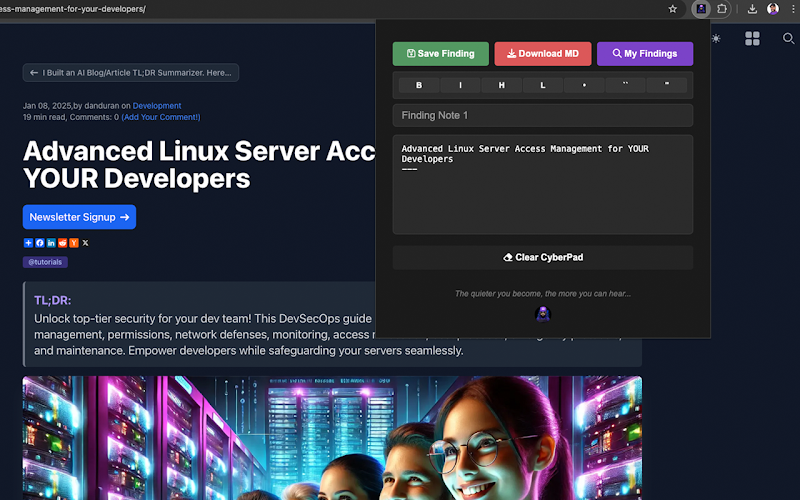
CyberPad Chrome Extension
A secure, distraction-free notepad for your security assessments, coding, or penetration testing. Perfect for quickly documenting findings, writing and formatting code, and keeping all your notes organized—right in your browser.
Download CyberPad!✨ What CyberPad Does
🛡️ Keeps Your Notes Private
Everything stays local in your browser—no cloud sync, no external connections.
🚀 Simplifies Security Work
Effortlessly capture vulnerabilities, bugs, or configuration changes during assessments and bug hunts.
🇱 Supports Multiple Languages
Highlight syntax for HTML, JavaScript, Python, PHP, CSS, and many more.
⭐ Dark & Minimalist Theme
Less strain on your eyes, more focus on your work.
✅ Easy Saving & Organization
Save multiple findings with timestamps, quickly download notes as Markdown, and stay on top of your work.
😎 Emoji Integration
Add 🛠️, ✅, or ⚠️ as quick status indicators.
⚡ Why You Should Install It
Local-Only Storage: No one else sees your notes. Perfect for pen-testing or handling sensitive info.
Effortless Reporting: Export Markdown files in one click for easy integration into your final reports.
Developer-Friendly: Write code, format it with built-in tools, and reference it later without leaving the browser.
Bug Bounty & Research: Keep track of new vulnerabilities or findings in real time.
Minimal Permissions: Only needs storage, contextMenus, and activeTab—ensuring your system stays secure.
🚀 Built For
Security Assessments
Document each step and vulnerability
Penetration Testing
Quick note-taking during engagements
Bug Bounty Hunting
Organized approach to discoveries
Development
Syntax highlighting and code snippets
System Administration
Document configurations and updates
Security Research
Compile and structure research data
⚙️ Key Features
HTML, JavaScript, Python, PHP, CSS, and more.
Format your notes for professional reporting, then export instantly.
Keep track of discoveries with automatic timestamps and simple snippet copying.
Quickly log and manage software bugs for easy reference.
🔒 Privacy & Security
🛡️ Stores notes only in your browser
🛡️ No external servers or cloud databases
🛡️ Minimal permissions, strict content security policy
🛡️ Manifest V3 compliance
🔧 Support
We're here to help you make the most out of CyberPad. Reach out to us through any of the following channels or join our community.
Community Forum
Join our Discord community to discuss features, share tips, and get help from other users.
Join Our DiscordPrivacy
CyberPad is committed to protecting your privacy. We do not collect, store, or transmit any personal information through this extension. Specifically, we do not:
- - Sell or transfer user data to third parties, outside of the approved use cases.
- - Use or transfer user data for purposes that are unrelated to our item's single purpose.
- - Use or transfer user data to determine creditworthiness or for lending purposes.
Single Purpose
CyberPad is a secure, local browser notepad that provides a single, distraction-free space to write and organize your notes or code without any external connections.
Permissions
Storage
CyberPad uses the storage permission to locally save your notes and settings in the browser. This ensures data remains accessible across sessions without needing an external server.
ContextMenus
The contextMenus permission is required so that CyberPad can add a custom option to the right-click menu. This allows you to quickly add highlighted text, URLs, or other relevant information directly into your notepad.
ActiveTab
The activeTab permission is needed if CyberPad automatically captures the current page’s URL or title to insert into your notes. It also enables the extension’s functionality to activate on the current tab when you click the extension icon.
Host Permissions
CyberPad requests <all_urls> permission to read highlighted text from any webpage. This allows you to right-click on selected text and send it to CyberPad. The extension only accesses a page's content when you explicitly use the context menu to capture highlighted text. Otherwise, it does not collect or transmit any data.
Remote Code
CyberPad does not use remote code. All functionalities are contained within the extension package, ensuring that no external scripts are executed.
Data Usage
CyberPad does not collect any of the following types of user data: Personally identifiable information, Health information, Financial and payment information, Authentication information, Personal communications, Location, Web history, User activity, or Website content.