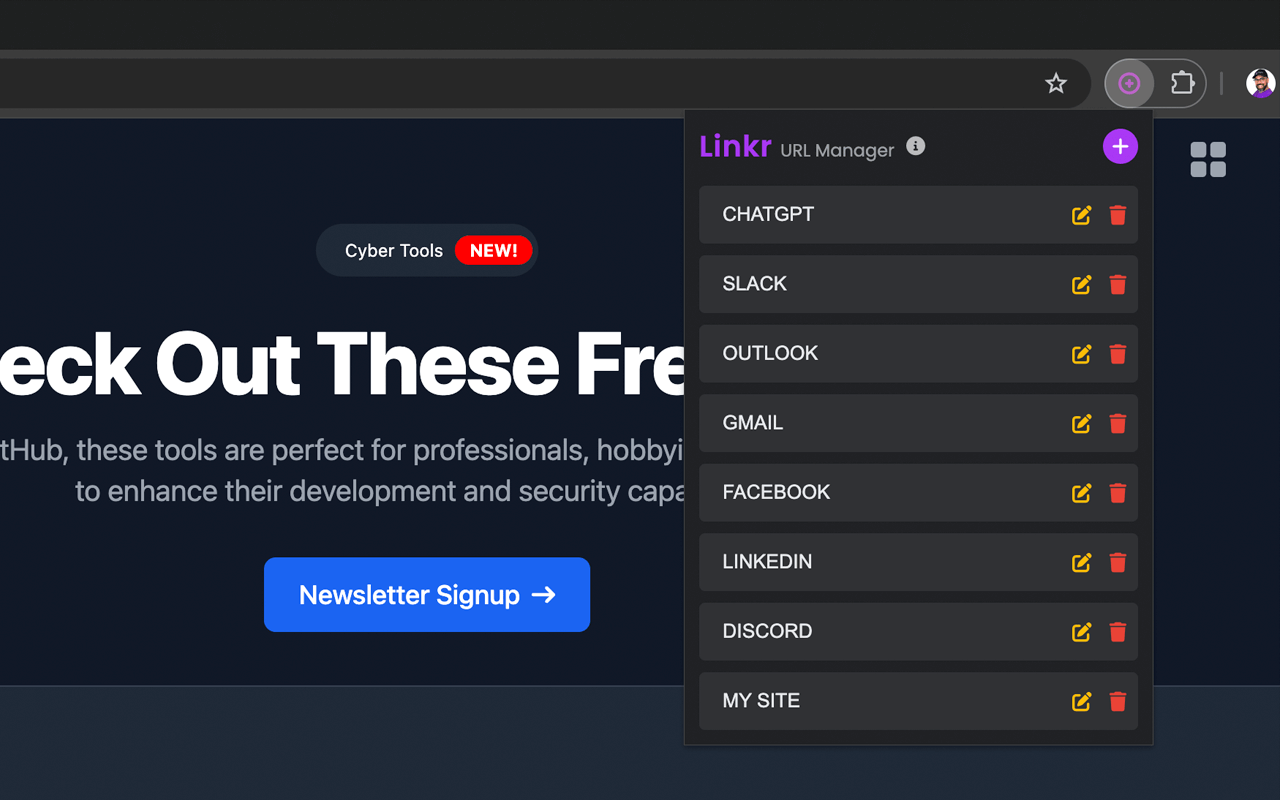
Linkr URL Manager Chrome Extension
Linkr is a lightweight browser extension that helps you organize and access your favorite websites with just one click. It offers a more visual and customizable alternative to traditional bookmarks with a modern, dark-themed interface.
Download Linkr!✨ What Linkr Does
🔗 Custom URL Management
Add, organize, and access your favorite sites with personalized button names for faster recognition.
🚀 One-Click Access
Open any of your saved links instantly in a new tab—no searching through bookmarks or typing URLs.
🔄 Drag-and-Drop Sorting
Easily reorder your links by dragging them to create logical groupings or prioritize frequent destinations.
⭐ Elegant Dark UI
Modern purple-themed dark interface that's easy on the eyes and looks stunning in your browser.
🔄 Cross-Device Sync
Your custom links follow you across all your devices when signed into your Chrome account.
📱 Space-Efficient Design
Collapsible input form maximizes space for your links, perfect for organizing many websites.
⚡ Why You Should Install It
Save Browser Real Estate: Unlike traditional bookmarks that clutter your browser's toolbar, Linkr keeps everything neatly organized in one popup.
Focus on What Matters: Curate only the links you actually use regularly, avoiding the bookmark hoarding that slows you down.
Intuitive Organization: Arrange your links in any order that makes sense to you with simple drag-and-drop—no more digging through bookmark folders.
Visual Recognition: Custom names and a clean interface make finding your links faster than scanning through dozens of bookmarks.
Minimal Permissions: Only requires storage permissions for saving your links—no extra permissions or data collection.
🚀 Built For
Busy Professionals
Quick access to essential work tools and websites
Students
Organize research resources and learning platforms
Developers
Instant access to documentation and coding resources
Remote Workers
Streamlined access to virtual meeting platforms
Content Creators
Quick links to publishing tools and inspiration sources
Productivity Enthusiasts
Optimized workflow with organized digital resources
⚙️ Key Features
Create buttons with custom names for your favorite websites, making them instantly recognizable and accessible.
Easily rearrange your links by dragging and dropping them into any order that makes sense for your workflow.
Your links follow you across all your devices when signed into your browser account, providing a consistent experience everywhere.
Enjoy the elegant, modern purple-themed dark interface that's gentle on the eyes during long browsing sessions.
🔒 Privacy & Security
🛡️ Simple storage permissions only - your data stays private
🛡️ Links sync only through your browser's built-in sync
🛡️ No tracking, analytics, or data collection
🛡️ Modern Manifest V3 compliance for enhanced security
🔧 Support
We're here to help you make the most out of Linkr. Reach out to us through any of the following channels or join our community.
Community Forum
Join our Discord community to discuss features, share tips, and get help from other users.
Join Our DiscordPrivacy
Linkr is committed to protecting your privacy. We do not collect, store, or transmit any personal information through this extension. Specifically, we do not:
- - Sell or transfer user data to third parties, outside of the approved use cases.
- - Use or transfer user data for purposes that are unrelated to our item's single purpose.
- - Use or transfer user data to determine creditworthiness or for lending purposes.
Single Purpose
Linkr is a simple, efficient URL manager that provides an organized space to store and access your favorite websites through customizable buttons with drag-and-drop functionality.
Permissions
Storage
Linkr uses the storage permission to locally save your URLs and their custom names in the browser. This ensures your links remain accessible across sessions and can be synced to other devices when signed into your browser account.
Remote Code
Linkr does not use remote code. All functionalities are contained within the extension package, ensuring that no external scripts are executed beyond the Font Awesome library used for icons.
Data Usage
Linkr does not collect any of the following types of user data: Personally identifiable information, Health information, Financial and payment information, Authentication information, Personal communications, Location, Web history, User activity, or Website content. The only data stored is your custom URL buttons, and this data never leaves your browser except through Chrome's built-in sync functionality.